Mp3 Music Downloader & Player
- 3.4
- Rating
- 500.00K
- Installs
- Free
- Price
 Analysis by App-foxy
I usually judge a music app by what happens after the first few days. Downloading a few tracks and enjoying offline playback is easy; the harder question is whether the app remains convenient when I return to it week after week. Mp3 Music Downloader & Player, developed by MusicPlayer-Studio, makes a straightforward promise: it is a free music and audio app for keeping MP3 music available when an internet connection is not practical. After spending time with it, I see a useful tool for listeners who already manage their own files, but not a complete replacement for every modern music service.
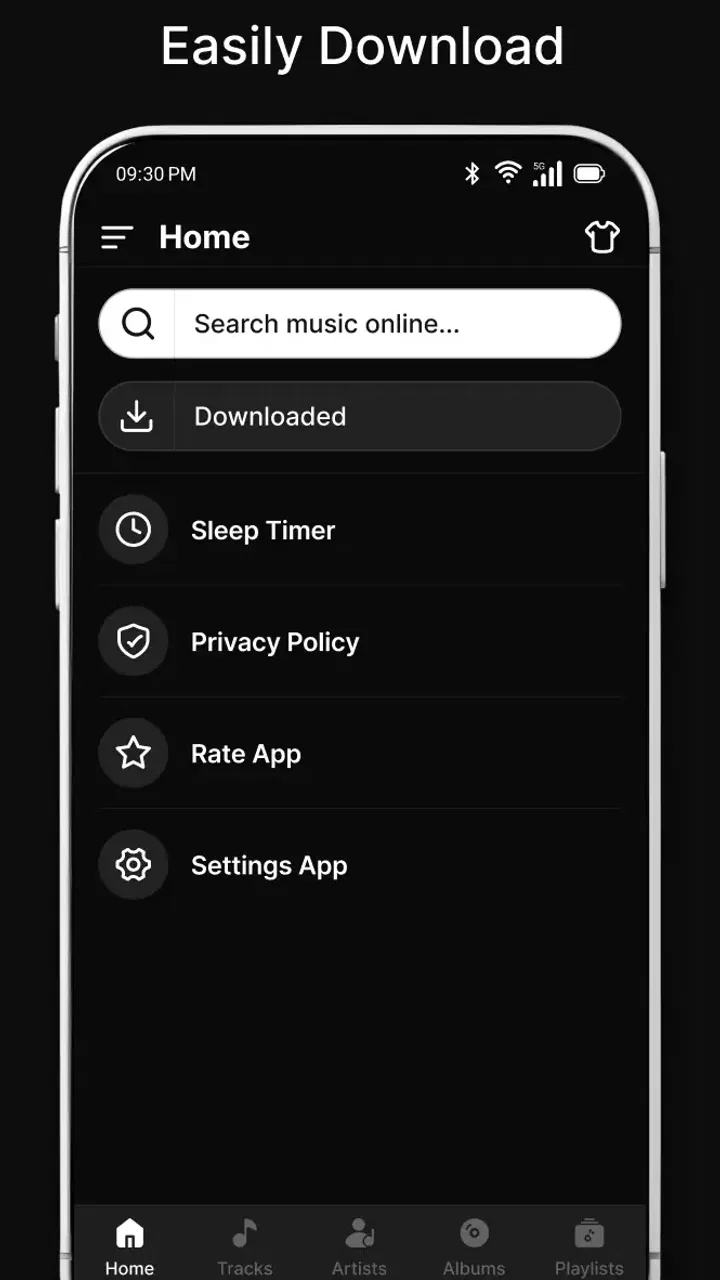
The first impression is appealing because the purpose is easy to understand. I can think of a song I want available later, download it, and use the player when I am away from reliable data. That simplicity matters during a commute, on a flight, in a building with poor reception, or anywhere I want to avoid streaming. The store positions it around offline listening and HD audio playback, and that focus gives the app a more practical identity than a service built mainly around recommendations.
There is also a reassuringly low barrier to trying it. The app is free, carries a Teen content rating, and runs on Android 7.0 or later. Its current version is 1-27.03.2026, so compatibility is broad enough for people using older supported phones as well as newer devices. MusicPlayer-Studio has attracted over 500 thousand installs, while its average rating sits at 3.4 from roughly 3.6 thousand ratings. That combination tells me the app has reached a meaningful audience, but the rating also suggests that the experience will not satisfy everyone equally.
You May Also Like

 Blood Strike: 2.5 Anniversary
Blood Strike’s Loadouts Turn Every Drop Into a Tactical Gamble
A close look at Blood Strike’s custom loadouts: how fast access to signature weapons reshapes its battle royale rhythm, rewards preparation, and narrows the gap between fights.

 Pandora - Music & Podcasts
Pandora’s Music Is Easy to Start, but Harder to Recover
Pandora’s strength is its low-effort path from a seed to a station. Its weak spot is how much confidence it asks you to place in connection, setup, and quiet recovery.

 8 Ball Pool
 Is Built on Rivalries, Rematches, and Routine
A close look at the rivalries, rematches, shared routines, and unanswered safety questions that turn a quick pool match into a persistent mobile community.

 Samsung Music
’s Quiet Strength Is Playing What You Already Own
Its reach comes less from spectacle than from dependable access to a personal library. That simplicity is both the app’s strongest retention engine and its ceiling.

 AccuWeather: Weather Radar
AccuWeather Review: A Quick, Clear Forecast for Everyday Decisions
For everyday plans, the best forecast is the one you can understand quickly. AccuWeather makes rain timing, radar, and local conditions easy to act on, with a few trade-offs.

 Hill Climb Racing
Why Hill Climb Racing Still Turns Crashes Into One More Run
A tiny car, a bumpy hill and one more upgrade: Hill Climb Racing keeps resurfacing because its simple chaos makes every near-miss feel personal.
More From Our News Desk
View All News


From first-week appeal to lasting listening habits
I find the first-week appeal easiest to judge by whether a small offline collection actually fits into my routine, rather than by how many tracks I can gather at once. A useful next step is to notice which moments make local playback feel worthwhile and which still call for a streaming service. That distinction leads naturally to how accessibility and everyday listening habits shape the app’s longer-term fit.
Why the first few sessions feel useful
During the first week, the strongest benefit is the change in how I think about access to music. Streaming apps make a huge catalog feel instantly available, but that convenience depends on an account, a connection, and the service continuing to carry the tracks I want. An offline MP3 player works differently. Once a file is on the phone, playback is no longer tied to signal strength. That is a small change, but it can make a real difference when I am trying to conserve mobile data or simply want predictable playback.
A realistic everyday example is a long train journey. Before leaving, I can prepare a small listening selection rather than relying on the route having stable coverage. I would use the downloader to gather the tracks I am allowed to obtain, then check that they appear correctly in the local library before leaving. On the journey, the player becomes the useful part of the experience: I can listen without repeatedly waiting for a stream to start or watching the phone search for a network.
The best early workflow is deliberate rather than impulsive. I would not download everything that looks interesting. I would create a compact group for a particular purpose, such as a morning playlist, a workout selection, or background music for travel. This keeps storage use under control and makes the local library easier to navigate. It also exposes an important trade-off: offline convenience is only valuable when the files are organized well enough to find quickly.
People who already have MP3 files on their phone may find the player more immediately useful than someone starting with an empty library. In that situation, the app can serve as a focused listening space instead of another enormous catalog demanding attention. I like that distinction. It makes the product feel closer to a personal music cabinet than to a social platform, and that can be refreshing for listeners who know exactly what they want to hear.
What I would check before relying on it
My first-week routine would include more than pressing play. I would test several file names, inspect whether tracks are easy to identify, and confirm that a downloaded selection remains available after leaving a network. I would also listen through headphones and the phone speaker, because “HD audio” is not a guarantee that every source file will sound excellent. The final result depends heavily on the quality of the MP3 itself; a player cannot restore detail that was removed before the file reached the device.
This is one of the app’s less obvious lessons. The download step and the listening step should be judged separately. A convenient player cannot make an unreliable source convenient, and a good source cannot compensate for a messy library. I would therefore treat the first week as a setup period: obtain music responsibly, remove files that are incomplete or poorly labeled, and keep only material I expect to revisit.
Another useful habit is to leave room for the phone itself. Offline music is more dependable when the device is not nearly full. I would avoid turning the app into a dumping ground for every track I might possibly hear. A smaller collection is faster to scan and easier to maintain, particularly on an older Android phone. This is not a special feature, but it is the difference between an offline player that feels calm and one that becomes another cluttered folder.
Where month-to-month value comes from
After the novelty fades, the app’s value depends on repetition. I would keep using it if it becomes part of a stable routine: preparing music before travel, listening during commutes, or keeping a personal collection available in places where streaming is inconvenient. Those are recurring needs, not one-time experiments. The app earns its place when it saves me the same small amount of effort every week.
Its strongest long-term audience is therefore fairly specific. It suits listeners who prefer ownership-like control over local MP3 files, people with limited or inconsistent connectivity, and anyone who wants a simple player without building their day around recommendations. It may also appeal to users who have older Android hardware and need an app that supports Android 7.0 or newer rather than requiring a recent device.
I would be less enthusiastic about recommending it to someone who expects a full streaming ecosystem. If your ideal music experience includes a constantly updated catalog, synchronized listening across devices, collaborative playlists, editorial discovery, or a polished account-based library, a mainstream streaming alternative will probably be a better fit. Mp3 Music Downloader & Player is more useful when the listener values local access over an all-in-one service.
The distinction becomes especially important for people who switch between phones. A local MP3 workflow can be portable, but it is not automatically seamless. Files may need to be moved and the library may need attention again. A cloud-centered service usually handles that transition more gracefully. In exchange, the local approach gives me more independence from a platform’s catalog and subscription structure. Neither model wins in every situation; the right choice depends on whether convenience or control matters more.
The maintenance that keeps the library usable
Maintenance is the quiet cost of an offline player. Every few weeks, I would review the library, remove duplicates, correct confusing names, and delete tracks I no longer listen to. I would also check newly downloaded files rather than assuming every transfer is perfect. This sounds minor, but it becomes noticeable when the collection grows. A player can make playback simple while still leaving me responsible for the housekeeping around the files.
My practical recommendation is to organize music by listening purpose instead of downloading in random batches. A travel group, a focus group, and a personal favorites group are easier to manage than one large stream of unrelated files. I would also avoid keeping several versions of the same song unless there is a clear reason, such as a live recording and a studio recording. That approach reduces scrolling and helps the app remain useful months later.
There is a second maintenance issue: remembering which music is actually stored locally. Streaming services often make offline content visible inside their own system, while a downloader and player depends more on the user’s awareness of the device library. Before an important journey, I would test the exact tracks I plan to hear. That simple check prevents the common mistake of discovering that a favorite song was never downloaded or that a file was removed during a cleanup.
For families or shared devices, I would be more cautious. A local player is personal by nature, and a library assembled by one person may not make sense to another. The Teen rating is worth noting for households where younger users may access the phone, but the rating alone does not turn the app into a curated family music environment. I would still supervise what is downloaded and how the device is used.
Where fatigue starts to appear
The first source of fatigue is repetition in the collection itself. Offline listening is wonderfully stable, but it does not automatically introduce me to something new. If I only use the app for the same downloaded tracks, it can become predictable. That is not necessarily a flaw—the app is doing its local-player job—but it means I may still keep a separate service for discovery and new releases.
The second source is the responsibility placed on the user. I have to decide what to download, confirm that the files are usable, maintain the library, and make room on the phone. For someone who wants music to appear instantly on every device, those steps can feel like unnecessary work. The free price makes experimentation easy, but free access does not remove the time cost of managing a personal collection.
Source quality is another point where expectations need to stay realistic. The phrase “HD audio player” describes the playback goal, not a guarantee that every downloaded MP3 has high-quality mastering. I would judge the sound using familiar tracks and decent headphones, but I would not blame the app for limitations already present in a compressed file. Listeners who care deeply about lossless audio, detailed metadata, or studio-grade library management may prefer a more specialized player.
The average rating of 3.4 is consistent with my balanced view: the concept is useful, yet a straightforward concept can still produce friction in real use. Some people will appreciate the direct offline purpose, while others will expect the polish and automation of a larger music platform. I would not install it expecting a magical catalog or a maintenance-free experience. I would install it because I specifically need local MP3 listening.
How it compares with familiar alternatives
Compared with a conventional streaming app, this one makes a different bargain. Streaming is usually better for discovery, instant access, and keeping a library synchronized through an account. Mp3 Music Downloader & Player is more appealing when I want files available without depending on a live connection. The trade-off is that I give up much of the automatic convenience and take on more responsibility for the collection.
Compared with a basic built-in phone player, it has a clearer identity around downloading MP3 music and using it offline. A built-in player may be enough for someone who only needs to open a few files, especially if those files are already neatly arranged. The dedicated approach becomes more worthwhile when I want one place for a recurring offline listening routine rather than occasional playback.
Compared with a specialized audio library application, it is likely to appeal more to ordinary listeners than to collectors who want deep tagging controls and detailed sound options. I would choose a specialist tool for a carefully cataloged archive, unusual formats, or advanced audio adjustments. I would choose this app for a simpler goal: keep accessible MP3 music on an Android phone and play it when I need it.
That comparison also answers a question many users have before installing: is it worth keeping alongside another music app? For me, yes, if the second app handles streaming and discovery while this one handles local offline listening. The two roles do not have to compete. However, if I only listen online and rarely manage files, maintaining both would add clutter without much benefit.
Who should keep using it
I would recommend it to a commuter who regularly loses signal, a traveler who wants a prepared offline selection, or a listener with a personal MP3 collection and no interest in algorithmic suggestions. It is also a reasonable option for someone testing a free way to separate local music from a larger streaming habit. The app’s broad Android compatibility makes it easier to consider on an older supported phone.
I would ask a different user to skip it: someone who wants one account, one synchronized library, and effortless access across several devices. I would also hesitate to recommend it to a person who dislikes file organization or expects every song to be found through a polished search-and-discovery system. The app rewards a little preparation; it does not hide that preparation from me.
Before installing, I would decide what problem I am solving. If the answer is “I need dependable offline playback for music I can legitimately store,” the app has a clear reason to exist. If the answer is “I want the largest possible catalog with no library management,” I would look elsewhere. This simple test prevents the most common disappointment: judging a local MP3 tool by the standards of a full streaming subscription.
My long-term verdict
After the first-week excitement, Mp3 Music Downloader & Player remains useful only when offline listening is a real recurring need. Its lasting strength is not novelty; it is predictability. I can prepare a personal selection, keep it on the device, and return to it without treating every listening session as a search for a network or a new recommendation.
At the same time, the app does not eliminate the work of owning a local collection. I still need to choose suitable files, check them, organize them, and occasionally clean up. That maintenance is acceptable for me because it buys independence and dependable access. For a listener who wants everything automated, it will feel like a burden rather than a benefit.
My final recommendation is therefore conditional but positive. I would keep it installed on a phone used for travel, commuting, or local music, especially because it is free and supports older Android versions. I would not make it my only music app unless my listening habits are already centered on MP3 files. Its lasting value comes from fitting a specific habit well, not from trying to replace every music service at once.
In short, this is a practical choice for people who value offline control more than endless discovery. It earns permanent space when I use it as a dependable personal player and keep the library tidy. If that sounds like the way you listen, MusicPlayer-Studio’s app is worth trying; if you want a fully managed streaming world, a different category of music service will serve you better.
FAQs for Mp3 Music Downloader & Player
01Is Mp3 Music Downloader & Player free to use?
Yes, Mp3 Music Downloader & Player offers a free version with basic features. However, there may be in-app purchases or premium options available that provide additional functionality, such as ad-free usage, enhanced audio quality, or offline listening capabilities. It's advisable to check the app store for specific pricing details.
02Can I download music for offline listening with this app?
Yes, Mp3 Music Downloader & Player allows users to download music for offline listening. This feature is particularly useful for those who want to enjoy their favorite tracks without an internet connection. Be sure to check if there are any limitations on the number of downloads or specific file formats supported.
03What audio formats does the app support?
The app typically supports a variety of audio formats, including MP3, WAV, and AAC, among others. It's important to verify the supported formats within the app's settings or documentation to ensure compatibility with your existing music library. This flexibility makes it easy to enjoy a wide range of audio files seamlessly.
04Is the app compatible with both Android and iOS devices?
Yes, Mp3 Music Downloader & Player is designed to be compatible with both Android and iOS devices. This cross-platform availability ensures that users can enjoy the app's features regardless of their device preference. Ensure that your device meets the app's minimum system requirements for optimal performance.
05Does the app include any ads?
The free version of Mp3 Music Downloader & Player may include ads to support its development and maintenance. Users who prefer an ad-free experience might consider purchasing the premium version, if available. Checking user reviews can provide insights into the frequency and impact of ads within the app.
Pros
- Easy to navigate user interface.
- Fast download speeds for tracks.
- Wide variety of music genres available.
- Offline playback for downloaded songs.
- High-quality audio downloads.
Cons
- Contains in-app advertisements.
- Limited free download options.
- Requires internet for searching tracks.
- Some songs may not be available.
- Occasional app crashes reported.

Mp3 Music Downloader & Player
Gallery